

Using an External System that Syncs to QuickBooks
- Posted on Jan 9, 2025
If you are using an external system that syncs to QuickBooks, are you taking the extra step to review and compare the data to make sure everything synced over correctly? You should be if not. Just like bank statements, we download the data via online banking and then we reconcile to the statement to correct ... Read More
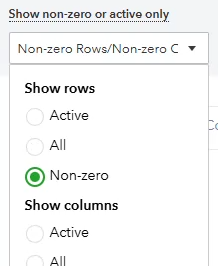
How-to Remove Zero’s on Reports
- Posted on Sep 24, 2024
If you ever go to pull reports, say a balance sheet or profit and loss report and you notice rows with zero’s. Did you know that there is a fix for that? There are two main reasons why this occurs: The first thing you need to do is try to fix the issues. If you ... Read More

Expenses by Vendor Summary Report Issue
- Posted on May 27, 2020
One of our client’s wanted to review their vendor expenses to see where some money could be cut. I pulled an expenses by vendor summary report for 2019 and changed the columns by month that way they would see what was on a recurring basis. The accrual report displayed fine, but the cash report was ... Read More

When QBO Online Banking Fails to Connect
- Posted on Apr 22, 2019
A new client came aboard recently and needed assistance troubleshooting their American Express card that would not connect for months in their QuickBooks Online (QBO). They got no where with Intuit or Amex support and were frustrated over the time it was taking with no solution as this was holding up the bookkeeping. Try updating ... Read More
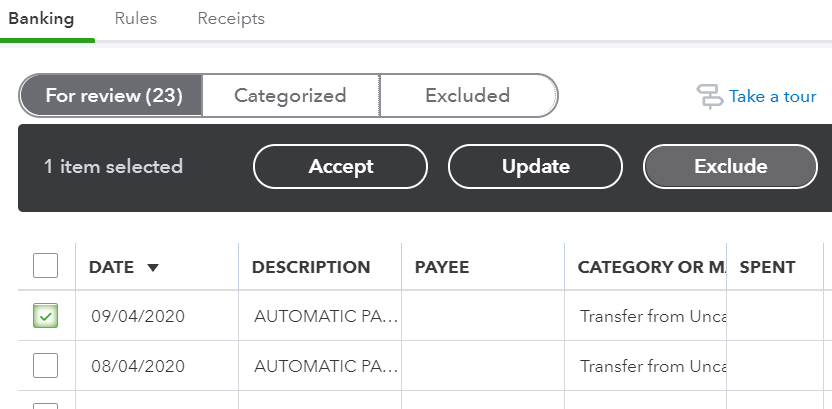
Exclude banking transactions in QBO – QuickBooks Online
- Posted on Oct 16, 2018
Have you ever needed to exclude banking transactions in QBO? It’s there for a reason and if you use the online banking function in QuickBooks Online, you need to know what it is for. I had a client once that didn’t get it, even after several explanations. Her not getting it was the result of ... Read More
Why Reconciling is Important
- Posted on May 31, 2018
We had a client that used accounting software that did not have a reconciling feature built into the software, you may have heard of it, QuickBooks Self-Employed. I guess their motto is that if you connect the program to your bank and download all the activity into the books, that is enough and no reconciling ... Read More

How much did I pay my vendors and receive from customers?
- Posted on Feb 27, 2018
There is a helpful report in QuickBooks that we get asked quite a bit how to do, how much did I pay my vendors and how much did I receive from customers? We had a client recently inquire over a report he needed on how much he has paid all his vendors for the year. ... Read More
Export Data from QuickBooks Online (QBO)
- Posted on Dec 7, 2017
Have you ever needed to Export Data from QuickBooks Online (QBO)? You may ask, why would I need to. We have seen clients go back to desktop version or simply just want a hard copy of the QBO data. To export data file from QBO, you would think it would be an easy process or ... Read More

Why are applying credits in QuickBooks important?
- Posted on Mar 19, 2017
An important process that is often missed in QuickBooks is applying credits to bills (accounts payable) and invoices (accounts receivable). Applying credits ensures you are not overpaying your bills or over billing your customers. See below for more. Accounts payable – If a credit comes in for your vendor and you don’t apply it to an existing bill after ... Read More

Using Memorized (Recurring) Transactions in QuickBooks
- Posted on Feb 26, 2017
Using Memorized (Recurring) Transactions in QuickBooks is a streamlined way to get recurring transactions in the books automatically. They can also help retain specific info that you want to enter on a consistent basis. QuickBooks can enter automatically on a schedule that you set up. In QuickBooks Desktop (QBD) it is called a memorized transactions ... Read More

QuickBooks Tutorial: How to pay sales tax with a credit card in QuickBooks Desktop
- Posted on Dec 31, 2015
It’s that time again to file sales tax. You have already made your payment online via a credit card and it’s time to enter the transaction into QuickBooks. You go to Vendors > Sales Tax > Pay Sales Tax, you select all the information to pay and realize that you don’t have the option to ... Read More
QuickBooks Tutorial: Why aren’t my deposits showing up on my reports?
- Posted on Dec 30, 2015
If you are new to QuickBooks and you are entering your deposits through the banking > make deposits window directly to an income account. You may be wondering why you don’t see this transaction in the customer or vendor center history and your QuickReports. In order for a transaction to link to the customer and vendor reports, it needs to ... Read More